Computed Fields
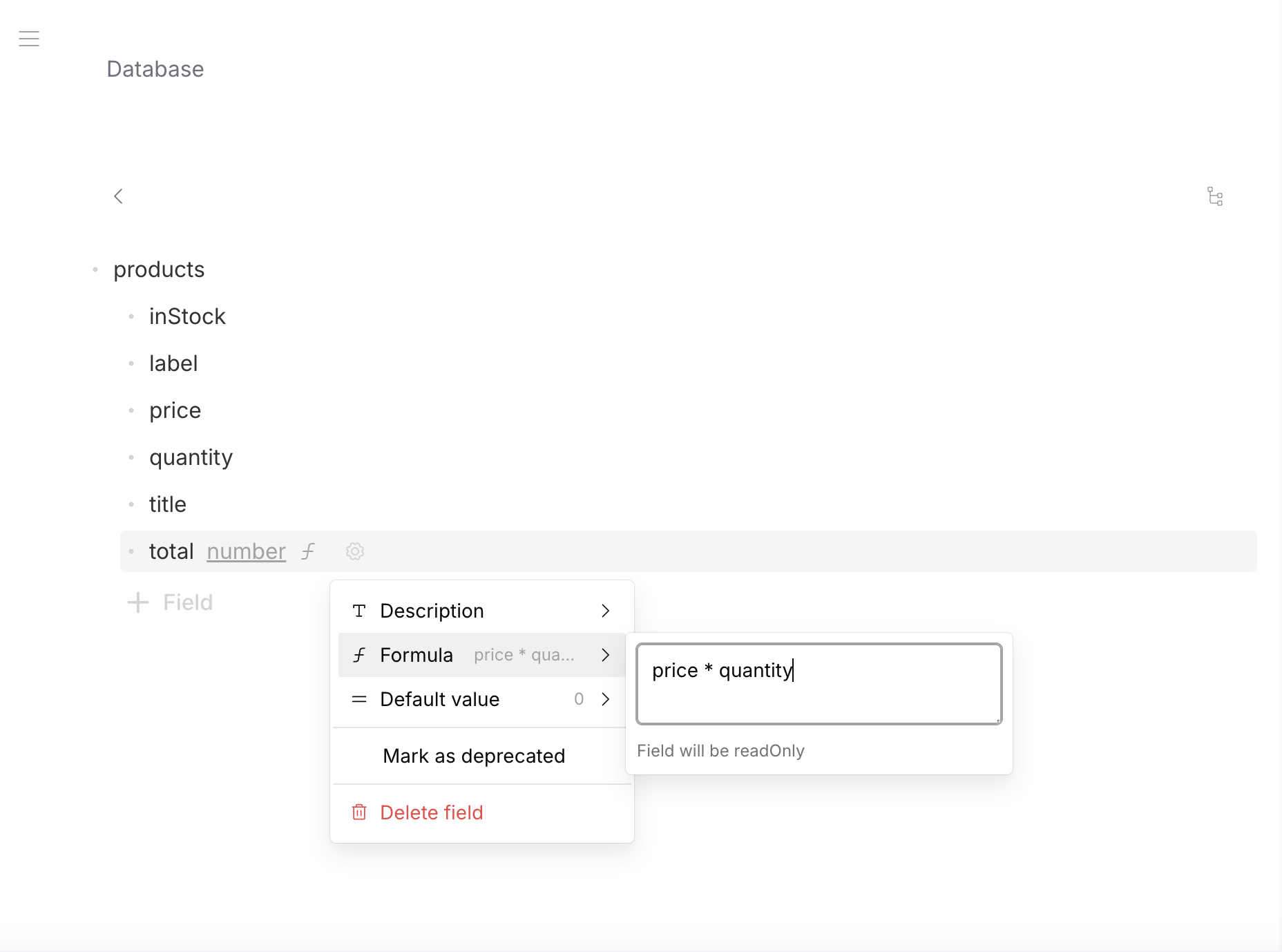
Computed fields are read-only fields whose values are calculated automatically from other fields in the same row. Define a formula in the schema — the platform computes and stores the result on every write.
Computed fields are not ephemeral — they are persisted in the database like regular fields. You can filter, sort, and query by them in APIs just like any other field.
Basic Computed Fields
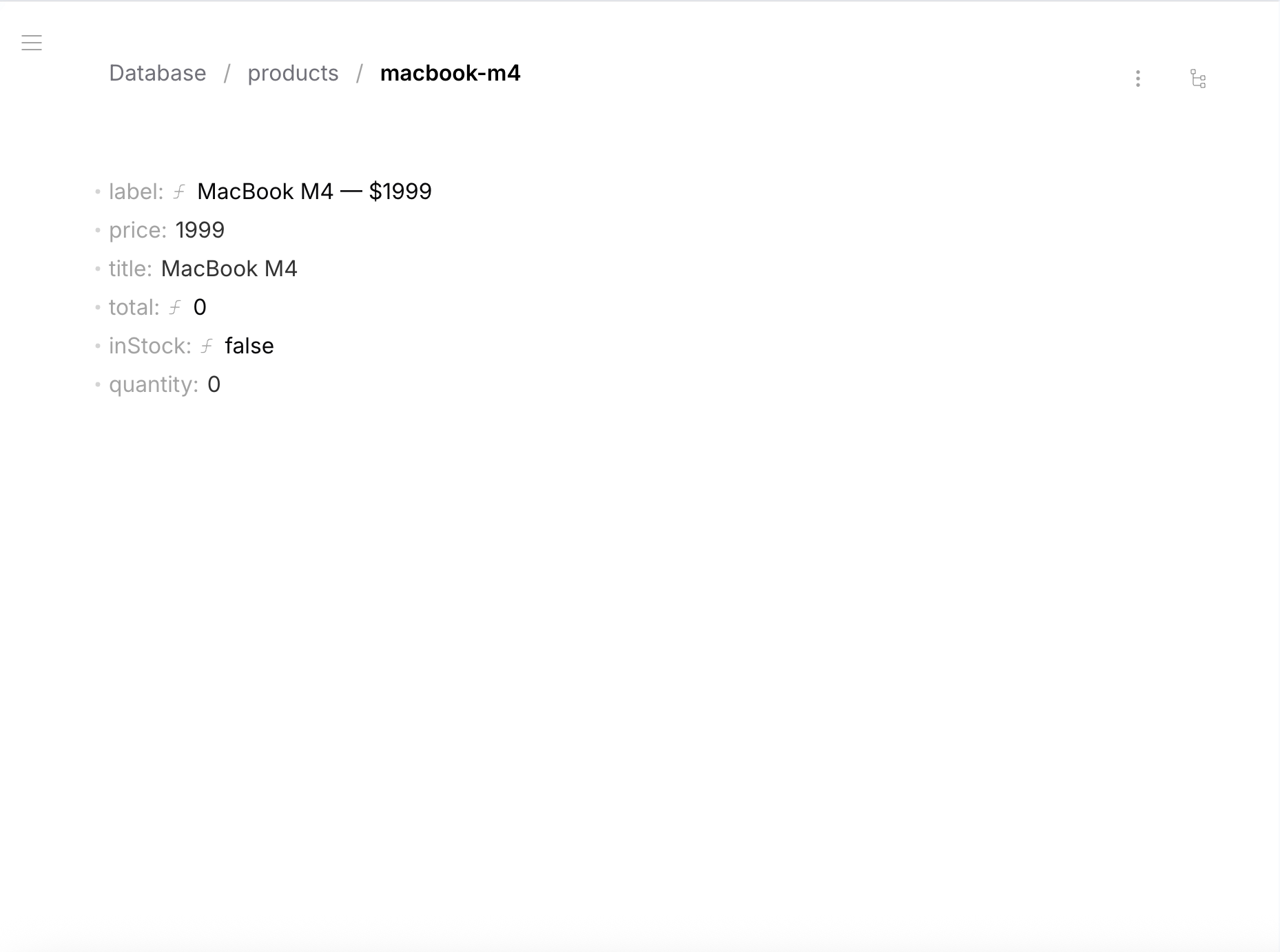
Add x-formula and readOnly: true to any string, number, or boolean field. Example: a products table with computed total, inStock, and label:
- Data
- Schema
{
  "title": "iPhone 16 Pro",
  "price": 999,
  "quantity": 50,
  "total": 49950,
  "inStock": true,
  "label": "iPhone 16 Pro — $999"
}
total, inStock, label are computed automatically — you only write title, price, quantity.
{
  "type": "object",
  "properties": {
    "title": { "type": "string", "default": "" },
    "price": { "type": "number", "default": 0 },
    "quantity": { "type": "number", "default": 0 },
    "total": {
      "type": "number", "default": 0, "readOnly": true,
      "x-formula": { "version": 1, "expression": "price * quantity" }
    },
    "inStock": {
      "type": "boolean", "default": false, "readOnly": true,
      "x-formula": { "version": 1, "expression": "quantity > 0" }
    },
    "label": {
      "type": "string", "default": "", "readOnly": true,
      "x-formula": { "version": 1, "expression": "title + \" — $\" + price" }
    }
  },
  "required": ["title", "price", "quantity", "total", "inStock", "label"],
  "additionalProperties": false
}
Array Formulas
Formulas inside array items can compute per-item values, reference root-level fields, use position context, and aggregate across all items.
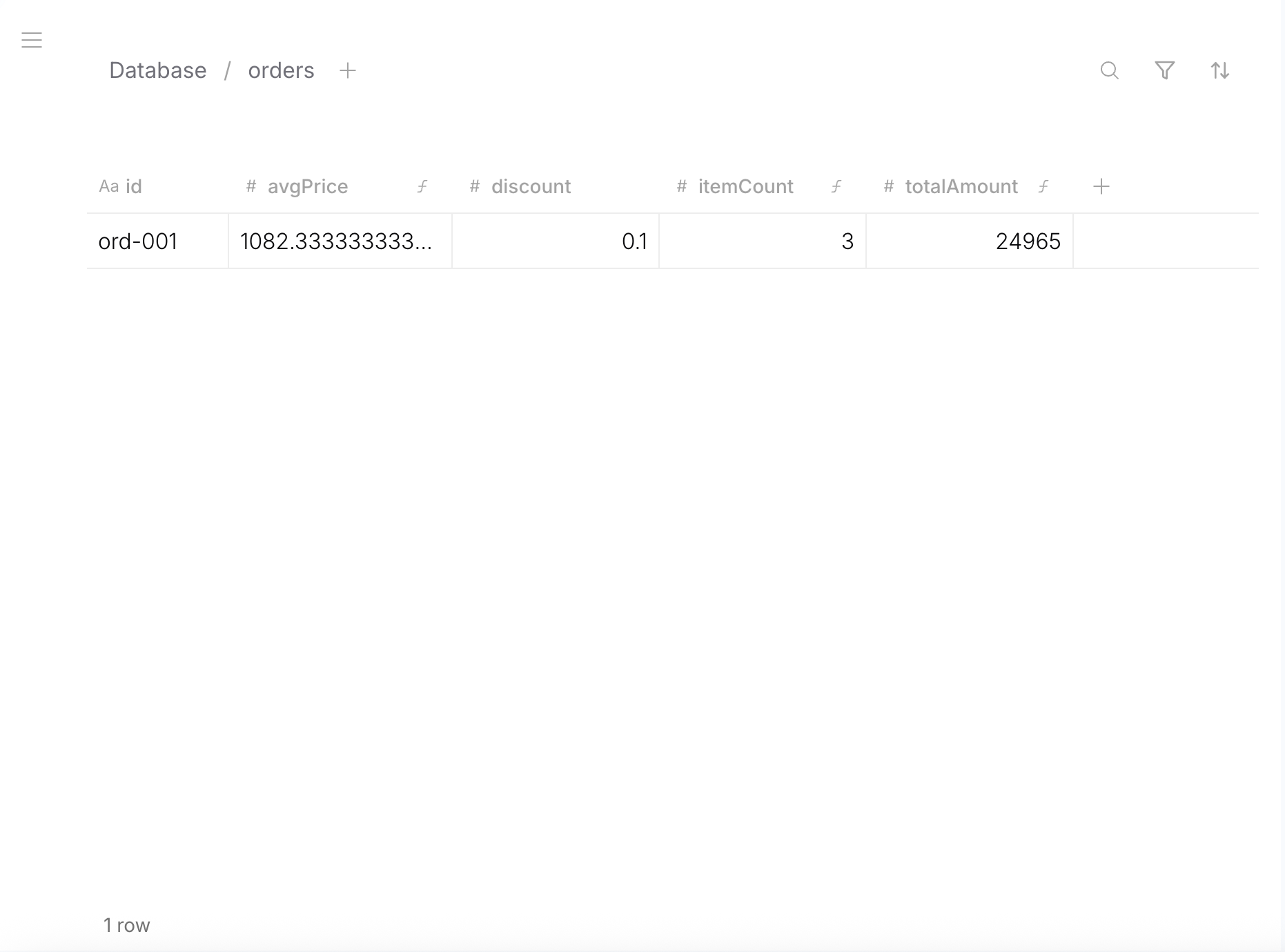
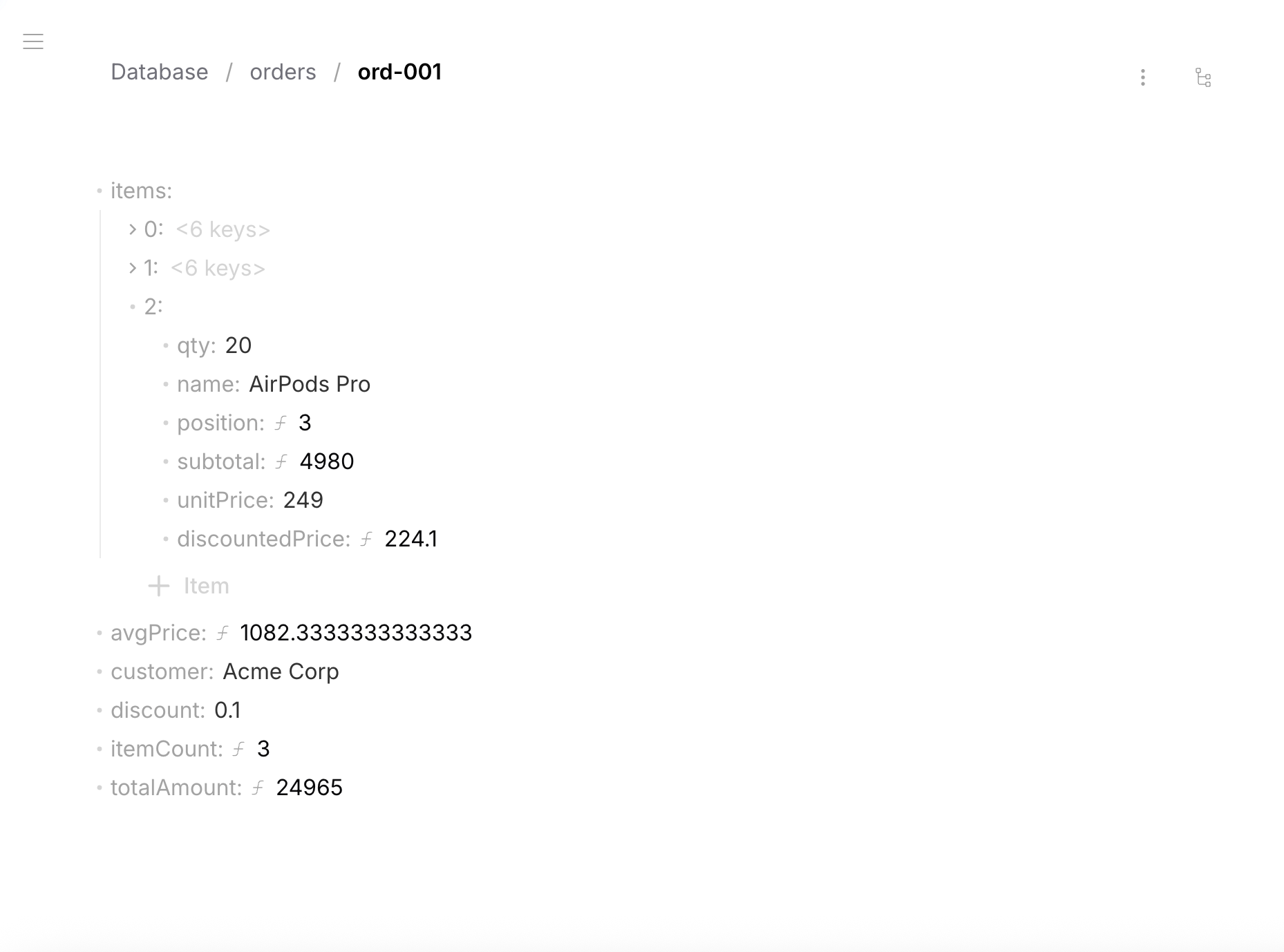
Example: an order with line items — each item computes subtotal and discounted price, the root computes totals:
- Data
- Schema
{
  "customer": "Acme Corp",
  "discount": 0.1,
  "items": [
    { "name": "iPhone 16 Pro", "qty": 10, "unitPrice": 999,
      "subtotal": 9990, "discountedPrice": 899.1, "position": 1 },
    { "name": "MacBook M4", "qty": 5, "unitPrice": 1999,
      "subtotal": 9995, "discountedPrice": 1799.1, "position": 2 },
    { "name": "AirPods Pro", "qty": 20, "unitPrice": 249,
      "subtotal": 4980, "discountedPrice": 224.1, "position": 3 }
  ],
  "totalAmount": 24965,
  "itemCount": 3,
  "avgPrice": 1082.33
}
{
  "type": "object",
  "properties": {
    "customer": { "type": "string", "default": "" },
    "discount": { "type": "number", "default": 0 },
    "items": {
      "type": "array",
      "items": {
        "type": "object",
        "properties": {
          "name": { "type": "string", "default": "" },
          "qty": { "type": "number", "default": 0 },
          "unitPrice": { "type": "number", "default": 0 },
          "subtotal": {
            "type": "number", "default": 0, "readOnly": true,
            "x-formula": { "version": 1, "expression": "qty * unitPrice" }
          },
          "discountedPrice": {
            "type": "number", "default": 0, "readOnly": true,
            "x-formula": { "version": 1, "expression": "unitPrice * (1 - /discount)" }
          },
          "position": {
            "type": "number", "default": 0, "readOnly": true,
            "x-formula": { "version": 1, "expression": "#index + 1" }
          }
        },
        "required": ["name", "qty", "unitPrice", "subtotal", "discountedPrice", "position"],
        "additionalProperties": false
      }
    },
    "totalAmount": {
      "type": "number", "default": 0, "readOnly": true,
      "x-formula": { "version": 1, "expression": "sum(items[*].subtotal)" }
    },
    "itemCount": {
      "type": "number", "default": 0, "readOnly": true,
      "x-formula": { "version": 1, "expression": "count(items)" }
    },
    "avgPrice": {
      "type": "number", "default": 0, "readOnly": true,
      "x-formula": { "version": 1, "expression": "avg(items[*].unitPrice)" }
    }
  },
  "required": ["customer", "discount", "items", "totalAmount", "itemCount", "avgPrice"],
  "additionalProperties": false
}
What's happening
| Formula | Location | What it does |
|---|---|---|
qty * unitPrice | Array item | Subtotal per line item |
unitPrice * (1 - /discount) | Array item | Uses root /discount for discounted price |
#index + 1 | Array item | 1-based position via context token |
sum(items[*].subtotal) | Root | Sum all subtotals using wildcard [*] |
count(items) | Root | Number of items in array |
avg(items[*].unitPrice) | Root | Average unit price across all items |
Context Tokens
Available inside array item formulas:
| Token | Type | Description |
|---|---|---|
#index | number | Current array index (0-based) |
#length | number | Array length |
#first | boolean | true if first element |
#last | boolean | true if last element |
@prev | object | Previous element (null if first) |
@next | object | Next element (null if last) |
#parent.index | number | Index in parent array (nested arrays) |
#root.index | number | Index in topmost array |
Practical Patterns
Running total (like Excel):
if(#first, subtotal, @prev.runningTotal + subtotal)
Nested numbering (sections[].questions[] → "1.1", "1.2", "2.1"):
concat(#parent.index + 1, ".", #index + 1)
Delta from previous:
if(#first, 0, value - @prev.value)
Field References
Simple — top-level fields
price * quantity
Nested paths — dot notation
stats.damage * multiplier
user.profile.name
Array index — specific element
items[0].price           // first
items[-1].name           // last
Array wildcard [*] — all elements
sum(items[*].subtotal)
avg(ratings[*].score)
orders[*].items[*].amount    // flatten nested arrays
Root path / — absolute reference from root
Always resolves from the top level, even inside array item formulas:
price * (1 + /taxRate)
unitPrice * /config.multiplier
Relative path ../ — go up one level
../discount                  // parent level
../../rootRate               // two levels up
../config.multiplier         // parent's nested field
Bracket notation — field names with hyphens
["field-name"]               // without brackets: field - name = subtraction!
obj["field-name"].value
Schema Rules
- Computed fields must have
"readOnly": true - Computed fields must have a
"default"value - Computed fields must be in the
"required"array - Expressions reference fields in the same row only
- Circular dependencies are not allowed
foreignKeyandx-formulacannot coexist on the same field
Limitations
- Formulas reference fields within the same row only. Cross-table computed fields are not supported.
- Computed fields are read-only — you cannot write to them directly.
Full specification: Formula SPEC.md
Reference: Operators
Arithmetic
| Operator | Description | Example |
|---|---|---|
+ | Addition / string concatenation | price + tax, first + " " + last |
- | Subtraction | price - discount |
* | Multiplication | price * quantity |
/ | Division | total / count |
% | Modulo | index % 2 |
Comparison
| Operator | Example |
|---|---|
== != | status == "active", role != "guest" |
> < >= <= | quantity > 0, price <= 1000 |
Logical
| Operator | Example |
|---|---|
&& | quantity > 0 && price < 1000 |
|| | role == "admin" || role == "editor" |
! | !isArchived |
Reference: Built-in Functions
String
| Function | Signature |
|---|---|
concat | concat(value1, value2, ...) → string |
upper / lower | upper(text) → string |
trim | trim(text) → string |
left / right | left(text, count) → string |
replace | replace(text, search, replacement) → string |
join | join(array, separator?) → string |
length | length(value) → number |
Numeric
| Function | Signature |
|---|---|
round | round(number, decimals?) → number |
floor / ceil | floor(number) → number |
abs | abs(number) → number |
sqrt | sqrt(number) → number |
pow | pow(base, exponent) → number |
min / max | min(value1, value2, ...) → number |
log / log10 / exp | log(number) → number |
sign | sign(number) → number |
Boolean
| Function | Signature |
|---|---|
contains | contains(text, search) → boolean |
startswith / endswith | startswith(text, prefix) → boolean |
includes | includes(array, value) → boolean |
isnull | isnull(value) → boolean |
and / or / not | and(a, b) → boolean |
Array
| Function | Signature |
|---|---|
sum | sum(array) → number |
avg | avg(array) → number |
count | count(array) → number |
first / last | first(array) → any |
Conditional
| Function | Signature |
|---|---|
if | if(condition, valueIfTrue, valueIfFalse) → any |
coalesce | coalesce(value1, value2, ...) → any |
Conversion
| Function | Signature |
|---|---|
tostring | tostring(value) → string |
tonumber | tonumber(value) → number |
toboolean | toboolean(value) → boolean |